

Profit Intelligence
Profit Intelligence combines sales, advertising spend, marketplace fees, cost of goods, and other expenses to show how revenue becomes gross and net profit. In the App, this workspace is labelled Dashboard.
The three views
Section titled “The three views”The Profit dashboard is one screen with three tabs, and they answer different questions:
| Tab | Answers |
|---|---|
| Tiles | What has this period done, and which products drove it |
| P&L | Where the money went, month by month |
| Trends | Which products are moving, and in which direction |
From sale to net profit
Section titled “From sale to net profit”The P&L tab lays out every deduction between what a shopper paid and what you kept, one column per month.
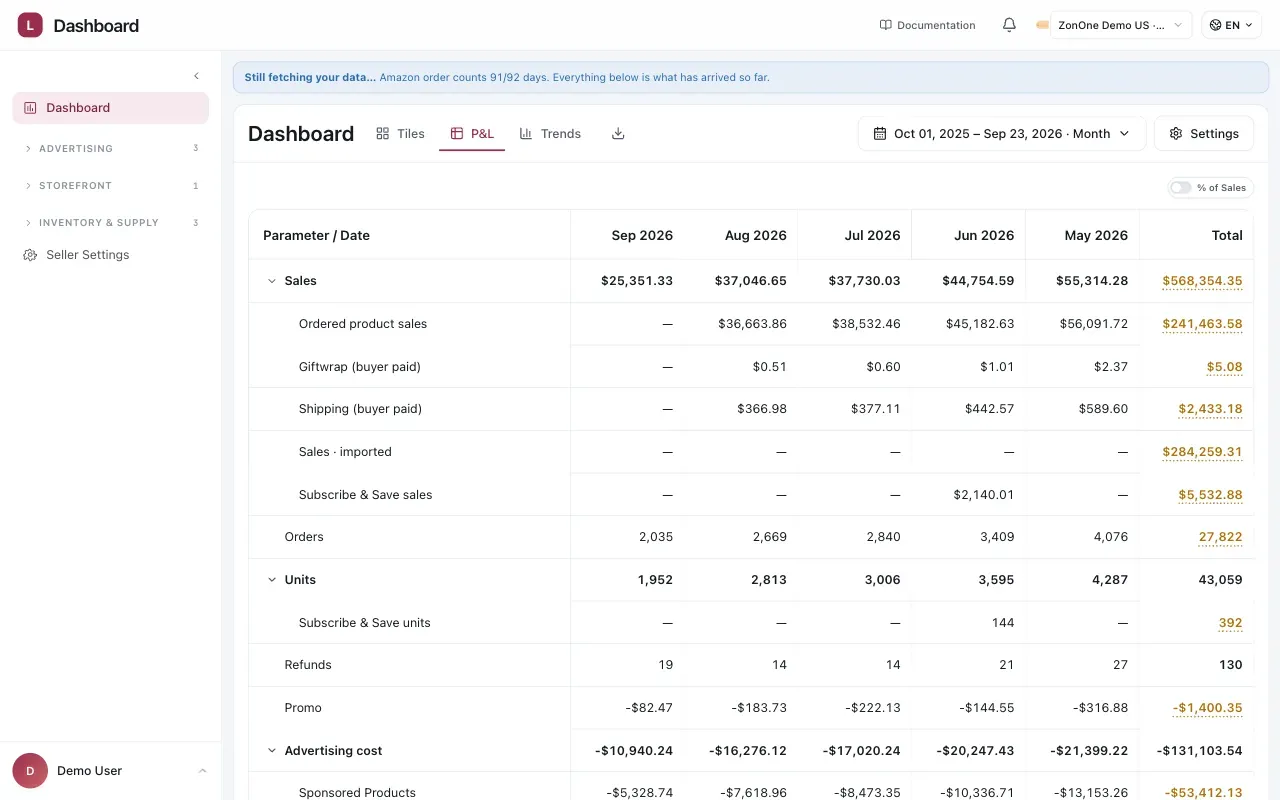
Advertising is one deduction among several, and it is the only one you change day to day.
Each monthly column follows the same P&L structure: sales, advertising spend, marketplace fees, and cost of goods are used to calculate gross profit. Indirect expenses are then deducted to calculate net profit.
Key cost lines
- Amazon fees & transaction costs is usually the largest deduction, larger than advertising, and it is the one you have least control over.
- Cost of goods is the only figure Amazon does not supply. If it is missing, gross profit is not wrong by a little — it is wrong by the whole cost of the product. See Cost of goods.
Advertising rows are indented because they contribute to the parent Advertising total. These can include Sponsored Products, Sponsored Brands, Sponsored Brands Video, Sponsored Display, imported advertising spend from before the Ads connection, and other marketing costs.
Every fee on its own line
Section titled “Every fee on its own line”Amazon reports multiple fee and adjustment types, including fulfilment, storage, freight, duty, transfers, reimbursements, and clawbacks. Vendlen keeps these charges on separate P&L lines so you can identify which costs changed:
Twenty-two named lines, in six groups. Every one of them arrives from Amazon separately, and stays separate here.
Reimbursements and credits stay separate too, rather than quietly netting off a cost you never saw. A warehouse-damage reimbursement that cancels a warehouse-damage loss leaves both lines visible, which is the only way to notice the loss is recurring.
Why ACOS is not enough
Section titled “Why ACOS is not enough”Two products, both running at 40% ACOS. One has a 55% break-even and is making money; the other has a 30% break-even and every order loses. ACOS cannot tell them apart, because it does not know what the product costs you.
That is what break-even ACOS is for, and why it sits on the Product Line rather than in a rule: it is a fact about the product, not about a campaign.
TACOS: advertising against everything
Section titled “TACOS: advertising against everything”ACOS measures ad spend against ad sales. TACOS measures ad spend against total sales, including the organic ones.
The difference matters as a product matures. Advertising that lifts organic rank looks expensive on ACOS and reasonable on TACOS, because ACOS cannot see the sales it helped produce indirectly. A falling TACOS with steady total sales usually means the organic position is doing more of the work.
Where to read it. The product table puts Ad Spend beside Ad Sales and then shows Real ACOS (TACOS): that product’s ad spend against all of its sales. Ad Spend against Ad Sales is the classic ACOS question; the TACOS column is the other one. Details, P&L and Trends show TACOS for the period, product or channel you are reading.
Ads Credit is not taken off TACOS. When the marketplace returns an Ads Credit, the Advertising group subtracts it, but the TACOS line does not. A credit is money handed back, not a cheaper auction: netting it would make the same campaigns look more efficient in a month the marketplace happened to issue one, and TACOS would stop comparing across months. So the Advertising total and the spend behind TACOS differ by exactly the credit. On a whole-account period, the spend behind TACOS also includes the marketing costs you entered.
Reading a period
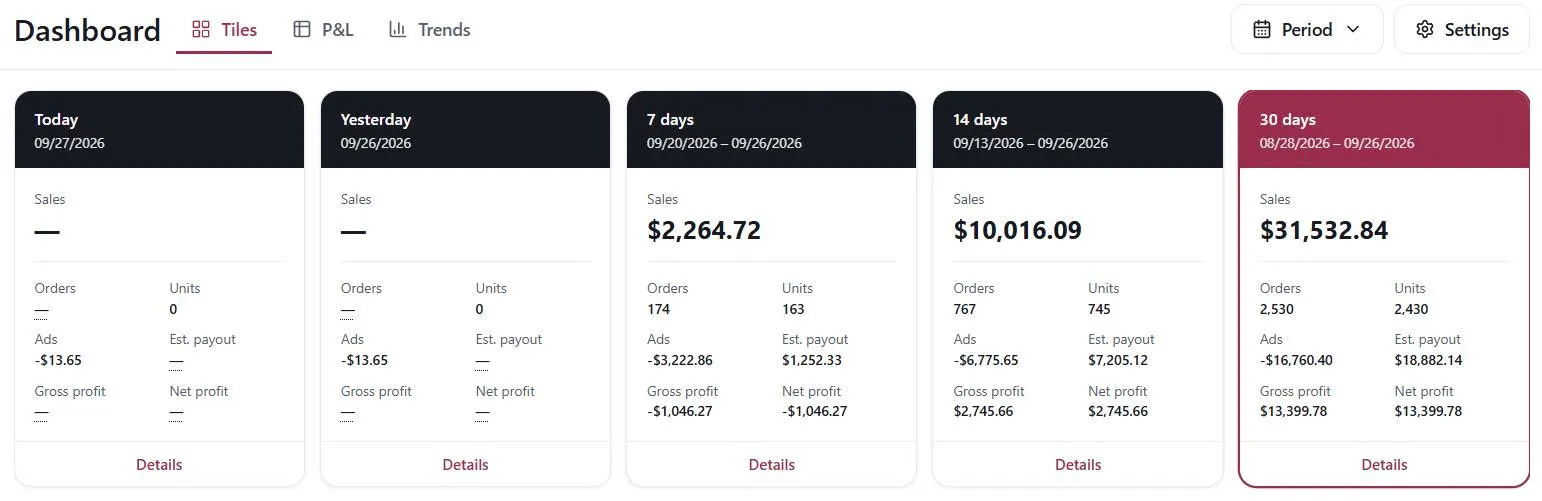
Section titled “Reading a period”The Tiles tab summarises five periods at once — today, yesterday, and the trailing 7, 14 and 30 days — each with sales, orders, units, ad spend, estimated payout, and gross and net profit.
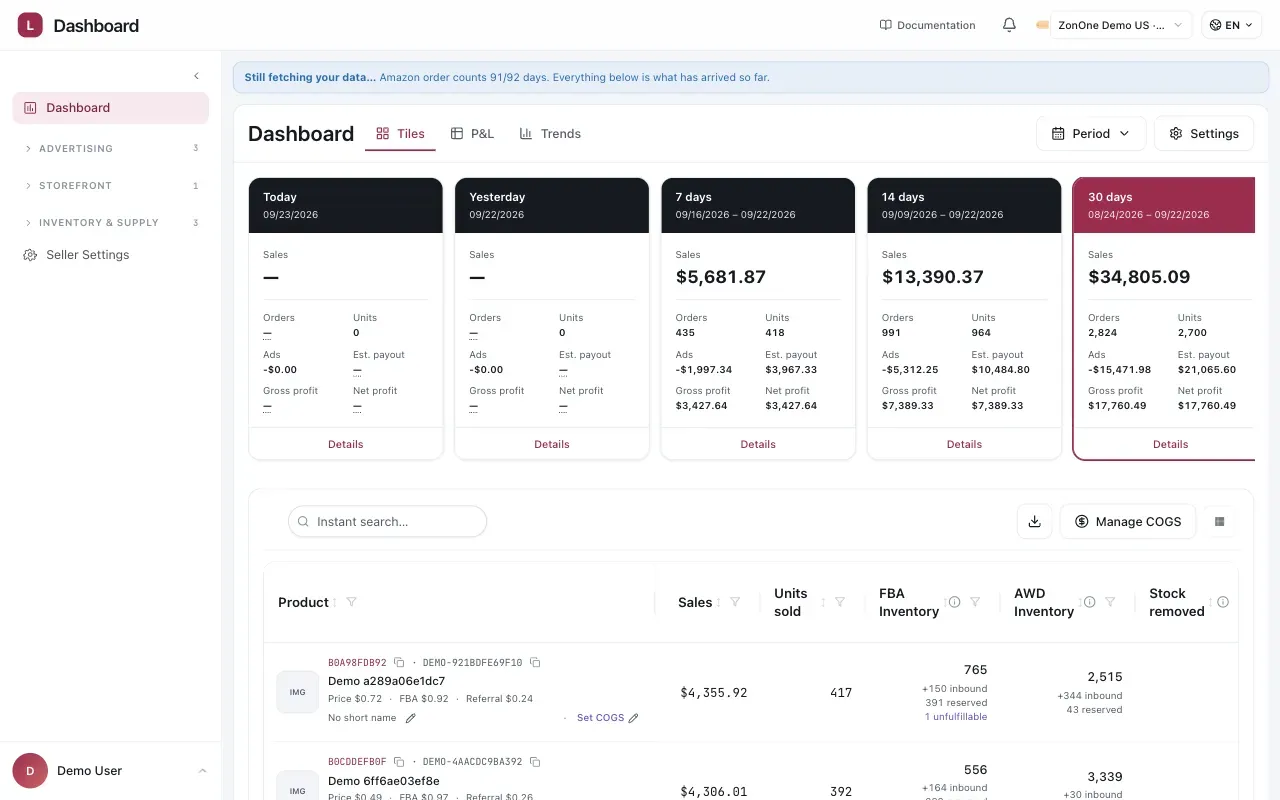
Five periods side by side. Today’s tile is a fragment of a day, not a small day.
Today is not a period. Its tile is a few hours of trading against a full day of nothing, and the profit line on it means very little. The 7, 14 and 30-day tiles are the ones to read.
Details opens the breakdown underneath the tile. Two habits are worth having.
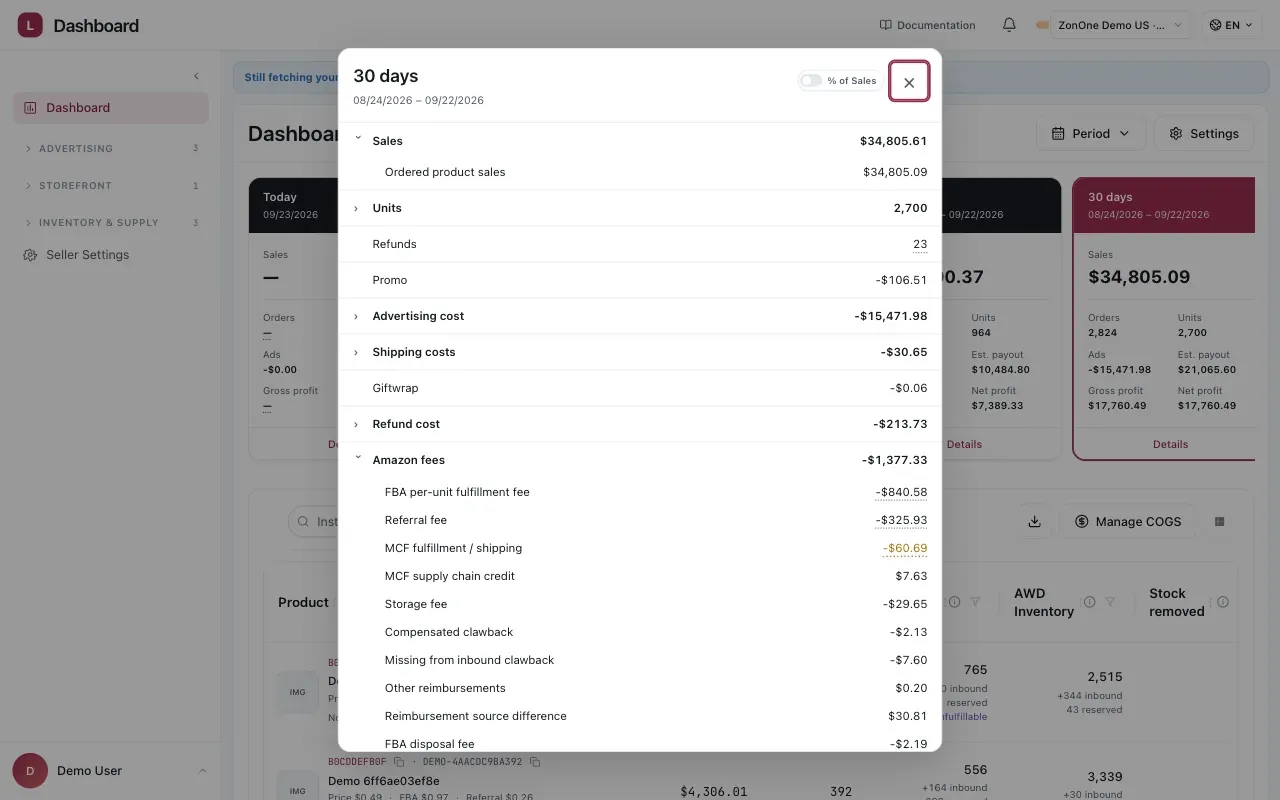
Expand a group to see the individual charges or credits behind its total.
Compare like with like. A 30-day period containing a Prime Day is not comparable to one that does not, and the conclusion you draw from the difference will be about the event, not the account.
Watch the recent edge. Amazon’s attribution keeps arriving, so the most recent days understate sales — the same lag that makes Automation ignore them. See Data Window.
The Trends tab compares complete periods product by product. Choose a metric and use the heatmap and percentage change to find movement; partial periods remain visible but do not receive a comparison.
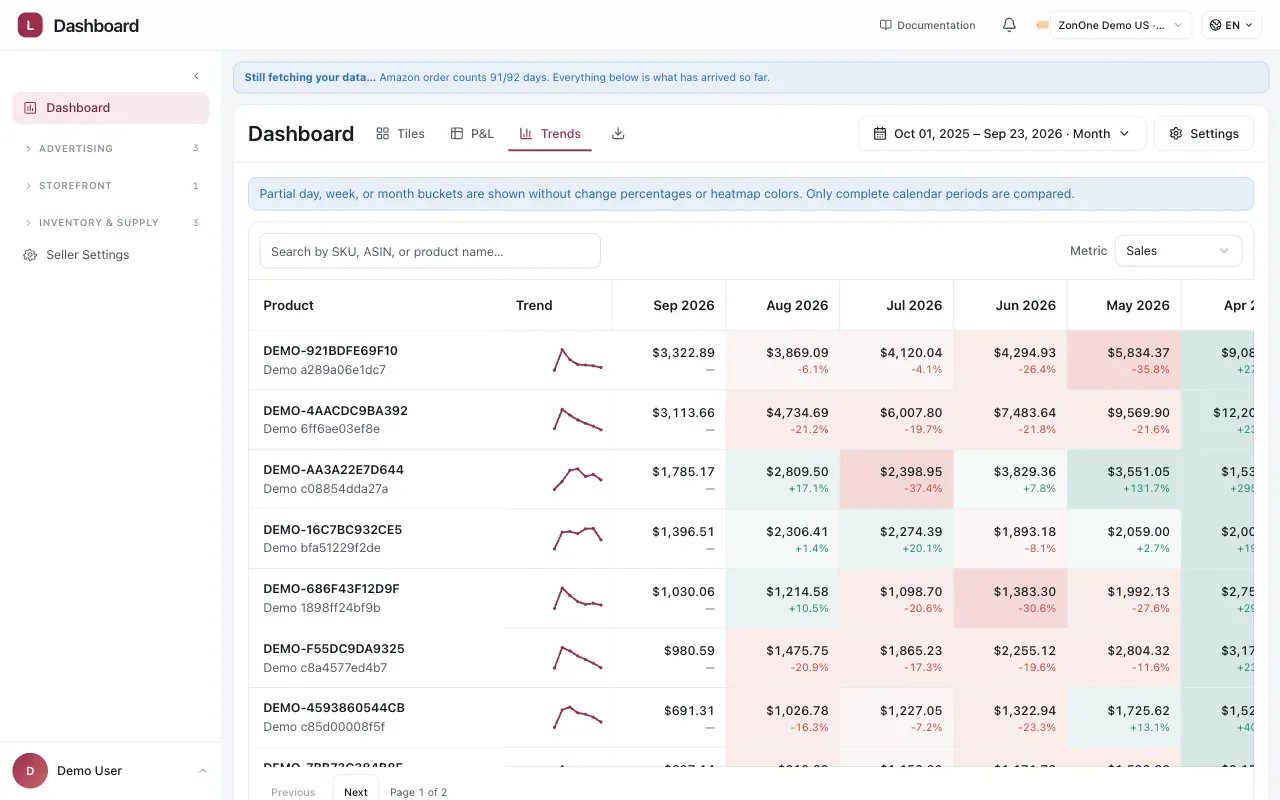
Partial periods show the value without a change percentage or heatmap colour.
Charging Amazon MCF to the channel that sold
Section titled “Charging Amazon MCF to the channel that sold”Amazon Multi-Channel Fulfilment (MCF) is Amazon shipping an order sold on another channel. The fee is recorded in Amazon’s books, but the P&L cost belongs with the channel that made the sale.
In Dashboard › Settings, turn on Charge cross-channel fulfillment, then use Allocate fulfillment cost to to choose the channels that may receive the fee. Walmart and TikTok can be selected independently, and you can select both.
Vendlen only moves a fee when it can match an Amazon MCF shipment to an order on a selected channel by product/SKU and date within three days either way. Each unit is consumed once. A match removes that MCF fee from Amazon and places it in the selling channel’s P&L, down to the SKU. Selecting more channels widens the matching search; it does not split one fee across channels.
Anything that cannot be matched stays in Amazon and remains visible. With no recipient channel selected, the fee stays on Amazon. Turning the switch off excludes MCF from profit calculations, so check the setting before comparing periods.
The related cost of goods follows the same accounting guard: matched units are removed from Amazon’s MCF cost and represented once using the Amazon-derived MCF COGS basis in the receiving channel’s P&L. It is not counted twice.
Walmart and TikTok (Beta)
Section titled “Walmart and TikTok (Beta)”The Dashboard can show Amazon, Walmart and TikTok as separate sales channels. Walmart and TikTok support is Beta. A channel appears in the selector when that seller has an active connection in Settings › Connections. In the multi-seller Summary Dashboard, it appears when at least one seller in the selected scope has that channel; the total includes only sellers connected to it.
Choose a channel to read its own Tiles and P&L data. The channel view uses that marketplace’s sales, fees, fulfilment and cost-of-goods lines rather than putting another channel’s numbers under an Amazon label. Trends is currently Amazon-only.
Marketplace data does not arrive all at once. A recently connected channel needs time to sync, and recent periods can have incomplete settlement-based fee coverage. A period with no settlement data yet cannot show the marketplace fees that have not been reported.
Where the numbers come from
Section titled “Where the numbers come from”Profit Intelligence combines data from marketplace connections, advertising connections, and values maintained in Vendlen.
| Data | Source |
|---|---|
| Amazon sales, refunds, and marketplace fees | Amazon Selling Partner API |
| Amazon advertising spend | Amazon Ads connection |
| Walmart and TikTok sales, fees, and fulfilment costs | Connected marketplace data |
| Walmart and TikTok marketplace-reported advertising | Channel settlement data |
| Advertising paid outside a marketplace | Manual input |
| Cost of goods | Vendlen / user-provided cost data |
Cost of goods is not provided by marketplace connections and must be supplied or calculated in Vendlen. See Cost of goods.
Missing COGS can overstate gross and net profit. Check COGS coverage before relying on profitability figures.
Considerations
Section titled “Considerations”- Profit Intelligence is a separate surface from the AI Analyst. Its figures are not an input to advertising decisions; they are the context you read those decisions against.
- Fees change. Amazon revises referral and fulfilment fees, and a product that was profitable last year may not be at the same price today.
VendlenPrivacy PolicyTerms of ServiceContact
© 2026 HELODA PTE. LTD. Not affiliated with or endorsed by Amazon.