

Order Planning
Order Planning turns a projected shortage into a proposal: what to order, for which channel, and the
week it has to arrive. Open it at /inventory and select Amazon, Walmart, or TikTok in the channel
control above the grid.
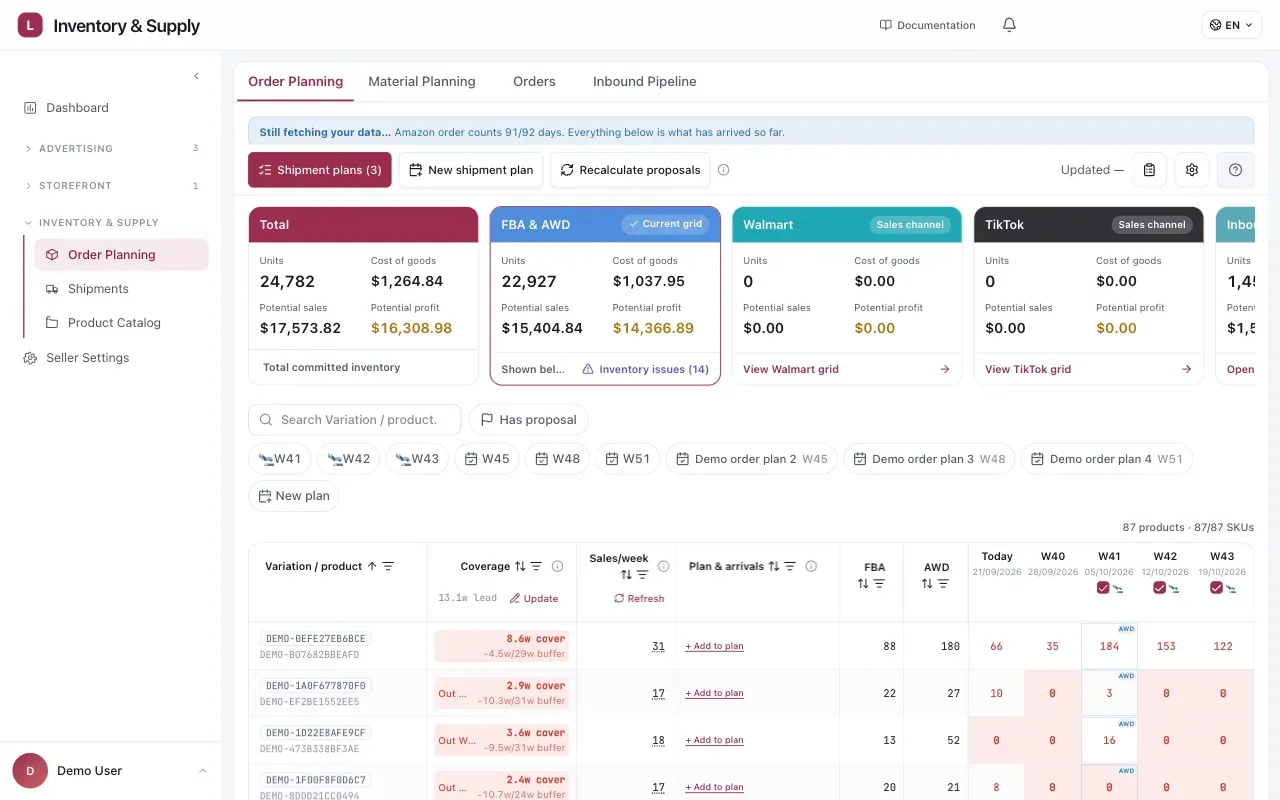
Order Planning brings channel totals, current stock, proposals, and the week-by-week projection into one workspace.
When a proposal appears
Section titled “When a proposal appears”A proposal appears when a Sales SKU’s stock on a channel will not cover its target. The target is the selling rate multiplied by the weeks you need covered: production and freight time, the review period, and your buffer. Against it the App sets what you already have: the stock in the channel’s warehouses plus committed inbound. Production orders that are approved or in production count too, for the units the factory has not finished yet. When more than one channel sells the SKU, each counts a share in proportion to its selling rate. The difference is the shortage. When the SKU has a carton size, the proposed quantity is rounded up to whole cartons.
Open a proposal to see that arithmetic under Why this quantity: the Target, what is On hand, what is Already in production when a production order counts, and the Proposed order. When carton rounding changes the quantity, the panel also shows Short by: how far On hand falls short of the Target.
A minimum order quantity does not hold a proposal back. A SKU that is short gets a proposal even when the quantity is below a minimum run. Both minimums — per production SKU and for the whole order — are checked later, when the plan becomes a purchase order. See Purchasing and Production.
Proposal statuses
Section titled “Proposal statuses”| Status | What it means |
|---|---|
| Needs review | A quantity is waiting for your decision. |
| Missing data | The App could not calculate a quantity, usually because a sales rate or inventory is missing. Update the data, then recalculate proposals. |
| Awaiting Amazon confirmation | An Amazon listing for the SKU is waiting for its mapping to be confirmed. Unconfirmed listings are left out of the sales rate and inventory. |
| Approved | The quantity has been added to a shipment plan. |
| Adjusted | You changed the quantity before approving it. |
| Skipped | You decided not to act on it. |
The shipment plan
Section titled “The shipment plan”Approving a proposal puts its quantity into a shipment plan: choose an existing plan or create a new one. Approving records the decision; it does not place an order with a supplier. You can adjust the quantity first.
The App treats the proposal as the total target for that plan, not an amount to add on top:
- If the plan already has a line for that SKU, the App tops it up to the target rather than adding the full quantity again.
- A line already at or above the target is left as it is.
- Moving a proposal to another plan merges its lines into that plan; it does not duplicate them.
Shipment plans above the grid opens the plans that do not have a purchase order yet. The drawer names the plan with its order date and arrival week, and splits into Shipment plan — the Sales SKU lines — and Production order — the same demand converted to production SKUs and cartons. The footer shows the production-unit and carton totals and whether the plan meets its MOQ. Other draft plans can be rolled into the same purchase order from Rolled into this PO.
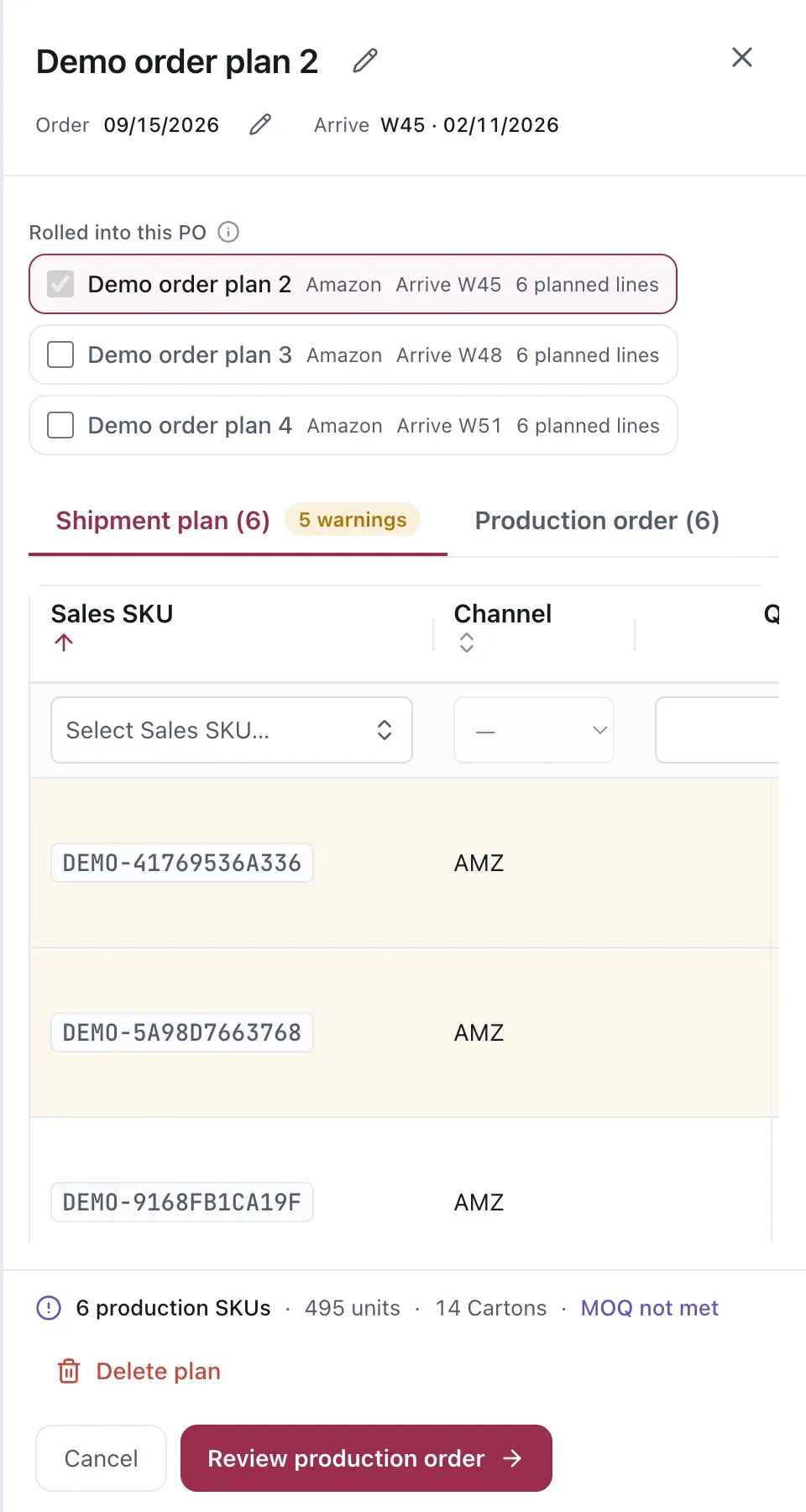
The drawer keeps the sales-SKU demand beside the production-order total and its MOQ status.
Minimums are checked at the purchase order
Section titled “Minimums are checked at the purchase order”A plan has to meet two minimums before it can become a purchase order: every production SKU must reach its own MOQ, and the production units across the whole order must reach the manufacturer’s total-order MOQ. Until both are met, the plan reads PO cannot be created yet. When they are, it reads Ready to create the PO.
When a plan falls short, add more quantity or roll another plan into the same purchase order; the check counts the combined quantity. The PO quantities are also rounded up to whole cartons, and any extra units from that rounding stay in Processed Stock.
Reading a proposal
Section titled “Reading a proposal”A proposal carries:
- The Sales SKU it is for. Older data contracts may call this a pack SKU.
- The quantity.
- The week. On a plan line this is the arrival week — the week the stock lands, shown as a week number and a date. Working back from it through transit and production is what gives you the week the order has to be placed.
The date is the part that matters. A quantity you can revise; a date that has already passed you cannot.
Combining SKUs
Section titled “Combining SKUs”Several Sales SKUs from the same production run will often reach their order week around the same time. Planning them together is usually how a run clears the manufacturer’s minimum — see Purchasing and Production.
Considerations
Section titled “Considerations”- A proposal is derived from the current selling rate. If you know demand is about to change, the proposal does not.
- Changing the buffer changes every order week for that SKU. That is the intended effect, but check the projection afterwards rather than assuming.
VendlenPrivacy PolicyTerms of ServiceContact
© 2026 HELODA PTE. LTD. Not affiliated with or endorsed by Amazon.